- Best AI Tools for Financial Modeling: We Tested 4 Leading Options (2026)
- Quick Answer: Which financial modeling AI tool should you use?
- Why financial modeling matters in investment banking
- What’s actually happening with AI inside investment banks
- Why AI financial modeling tools feel magical — until they don’t
- The AI financial modeling tools landscape
- Wall Street Prep’s AI Tools Advisory
- The rankings – Shortcut takes the #1 spot as best financial modeling tool
- Criteria #1: How it feels working with the tool
- Criteria #2: Data Extraction, Formatting and Modeling Best Practices
- Criteria #3: Forecasting, structure, and integration
- The best AI financial modeling tool is not as good as a bad analyst
- Final takeaway
- Methodology
Best AI Tools for Financial Modeling: We Tested 4 Leading Options (2026)
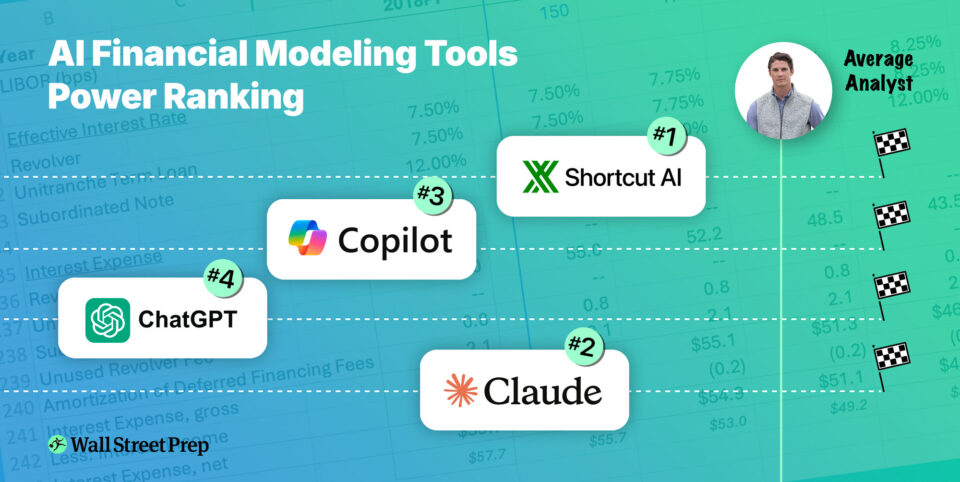
We comprehensively tested four leading AI financial modeling tools — Shortcut, Claude, Microsoft Copilot (Agent Mode), and ChatGPT — by asking each to do exactly what we ask our analyst trainees to do – build a fully integrated three-statement model. In this article, we share exactly how they all performed, and how that compares to real life human analysts.
Quick Answer: Which financial modeling AI tool should you use?
🥇 Best Overall: Shortcut
🥈 Close Second: Claude in Excel
🥉 Third Place: Microsoft Copilot
🏅 Distant Fourth: ChatGPT
Bottom Line: We tested all four tools by building Apple’s three-statement model. Shortcut and Claude significantly outperform Copilot and ChatGPT — but even the best tool still underperforms a Junior Analyst.
Summary ranking scorecard
| Category | Winner | Shortcut | Claude | Copilot | ChatGPT | Top Analyst | Mid Analyst | Low Analyst | |
|---|---|---|---|---|---|---|---|---|---|
| Speed and Understanding Intent | Claude & Shortcut | 10.0 | 10.0 | 7.0 | 0.0 | 5.0 | 3.0 | 1.0 | |
| Accuracy of Data Extraction, Formatting and Modeling Best Practices | Shortcut | 5.7 | 5.0 | 3.0 | 4.0 | 10.0 | 8.3 | 6.7 | |
| Quality and Rigor of Forecasting and Model Structure | Shortcut | 5.0 | 4.8 | 4.8 | 2.0 | 10.0 | 8.8 | 7.5 | |
| Overall Score | 🥇5.9 | 🥈5.5 | 🥉4.4 | 🏅2.5 | 9.4 | 7.9 | 6.4 |
Key insights on working with AI financial modeling tools
- Good use case: Kickstarting models from scratch (0 to 60% complete)
- Bad use case: Trusting AI to finish the job without extensive review
- Reality check: Even the best tool (Shortcut) underperforms a lower-tier analyst
- Hidden risk: AI tools hide errors in places humans usually don’t look
Why financial modeling matters in investment banking

Free Course: Build a 3-Statement Model in 90 minutes.
Financial modeling has traditionally been the most durable skill a junior investment banker can have. It’s hard to fake, easy to test, and time-consuming to master. Strong modelers stand out, advance faster, and earn favorable reputations early.
Now that AI can build financial models, the question is not whether the tools are impressive —they are — but which, if any, actually live up to the hype.
What’s actually happening with AI inside investment banks
Despite the headlines, almost nobody has meaningfully changed their day-to-day financial modeling workflow. Analysts still open Excel, reuse old templates, and build models the way they always have.
So how is AI impacting investment banking workflows in 2026? Banks are piloting a growing number of AI tools that promise productivity gains, but security concerns, uneven performance, and limited real-world reliability have kept most deployments in experimental mode.
Presumably, as the software improves and users learn where it helps and where it breaks, adoption will grow. But for now, investment bankers are still the ones building the models.
Want to Master AI Tools for Finance?
Learn how to leverage AI without getting replaced. Wall Street Prep & Columbia Business School’s AI in Finance & Business Certificate teaches you to use tools like Claude and ChatGPT effectively for financial analysis, modeling, and more.
Why AI financial modeling tools feel magical — until they don’t
The first experience with most AI modeling tools is genuinely astonishing. They do things that feel, briefly, like game-changers.
The second experience is typically less so.
Once you try to use them for real work — large files, slightly messy data, constant iteration, waiting for recalculations, fixing small downstream errors — it’s clear that these tools struggle with the unglamorous parts of financial modeling. Unfortunately, those unglamorous parts are most of the job.
Key Takeaway: These tools save time early in the modeling process, but introduce hidden risks if trusted too deeply.
The AI financial modeling tools landscape
We evaluated four leading AI tools – Claude, Copilot, ChatGPT and Shortcut – by asking each to build a fully integrated three-statement model for Apple using real SEC filings and consensus forecasts.
AI tools for financial modeling are best described as a race between large LLMs that have built their own financial modeling capabilities (Anthropic’s Claude, ChatGPT and Microsoft Copilot) and specialist tools focusing specifically on Excel and modeling (Shortcut, Endex and others).
Let’s call the big ones the “bulge brackets” of AI and the specialists “the boutiques.”


Wall Street Prep’s
AI Tools Advisory
WSP’s AI Tools Advisory supports over 50 investment banking, private equity and investment firms with the evaluation, deployment and training of the leading AI tools in finance.
Book a ConsultationTools Tested (with Model Versions)
Note: Because these models are improving rapidly, we’re going to be updating these rankings quaterly.
Claude (we tested Opus 4.6) has explicitly gone after the investment banking workflow.
Microsoft Copilot (we tested GPT 5), being deeply integrated into Excel, has a native advantage in that it isn’t a 3-rd party add-in.
OpenAI’s ChatGPT (we tested 5.2) remains the 800lb gorilla of LLMs, and does produce Excel files you can import, albeit not inside Excel yet.
Lastly, Shortcut (we tested v7.4) is an Excel add-in developed by Fundamental Research Labs. In contrast to the large LLMs in the ranking, Shortcut is built by a smaller, VC-backed startup specifically tackling financial analysis and financial modeling.
There are a few other boutique tools going after the modeling workflow, most notably Endex, backed by OpenAI Startup Fund. We were unable to test Endex for this evaluation, but we intend to in the future.
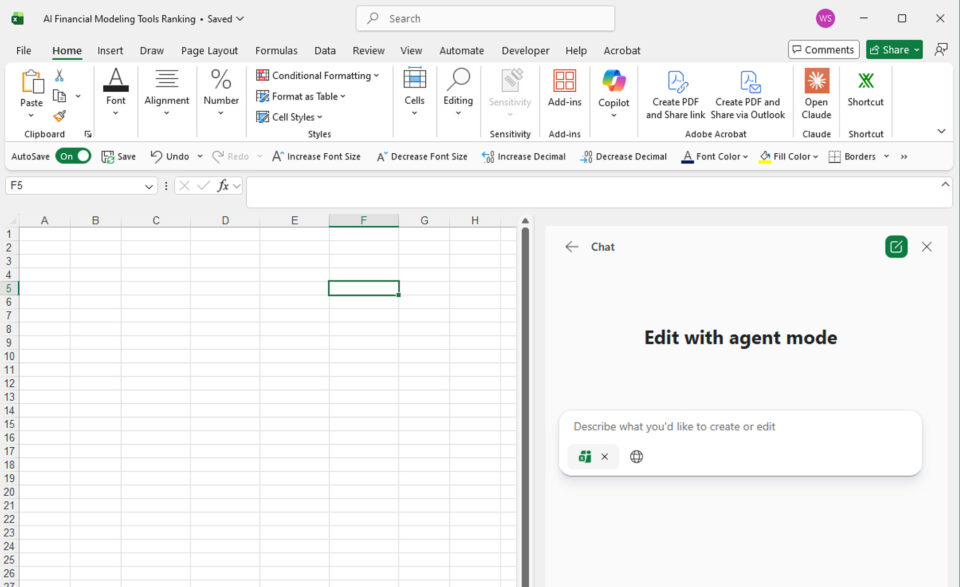
Microsoft Copilot (Agent Mode) is embedded directly in Excel, Claude and Shortcut need to be installed as addins, and ChatGPT isn’t (yet) integrated with Excel
The task: build a three-statement financial model
For this evaluation, we asked Claude, Shortcut, ChatGPT, and Copilot (Agent Mode) to build Apple’s latest three-statement model using the following prompt:
This is a non-trivial assignment. A strong Analyst typically needs 2–3 hours to do this well from scratch.
We evaluated the output the same way we would evaluate an analyst in training — by breaking the work into three categories, each with multiple subtasks.
A quick caveat: Just as it would be unfair to judge a human analyst solely on their ability to build a three-statement model from scratch, the same is true for an agent. How well does it fix its own mistakes? How does it respond to feedback? How does it perform if you feed it clean data instead of asking it to scrape the internet? How well does it do when working with a pre-existing template?
All fair questions.
Still, the three-statement model is a useful all around test. It touches accounting, corporate finance, forecasting, model mechanics, and data analysis. An agent that struggles here will struggle elsewhere too.
The rankings – Shortcut takes the #1 spot as best financial modeling tool
Shortcut wins overall — with Claude right behind it.
Both Shortcut and Claude perform meaningfully better than Copilot and ChatGPT. If an analyst has a choice of which tool to use today, Shortcut and Claude are the ones worth considering.
Criteria #1: How it feels working with the tool
First, we evaluated the UX and how the tool behaves before any serious modeling begins: Does it understand the assignment, ask clarifying questions, and work efficiently?
This is the only category in which an agent outperformed a top analyst.
Understanding the assignment: 🏆 Claude and Shortcut tie
Claude and Shortcut asked thoughtful clarifying questions after receiving the prompt — about forecast preferences (consensus vs management guidance), revenue segmentation, share repurchases, layout decisions, and schedule structure. That behavior closely resembles what you’d want from a good junior analyst.
Copilot and ChatGPT asked none.
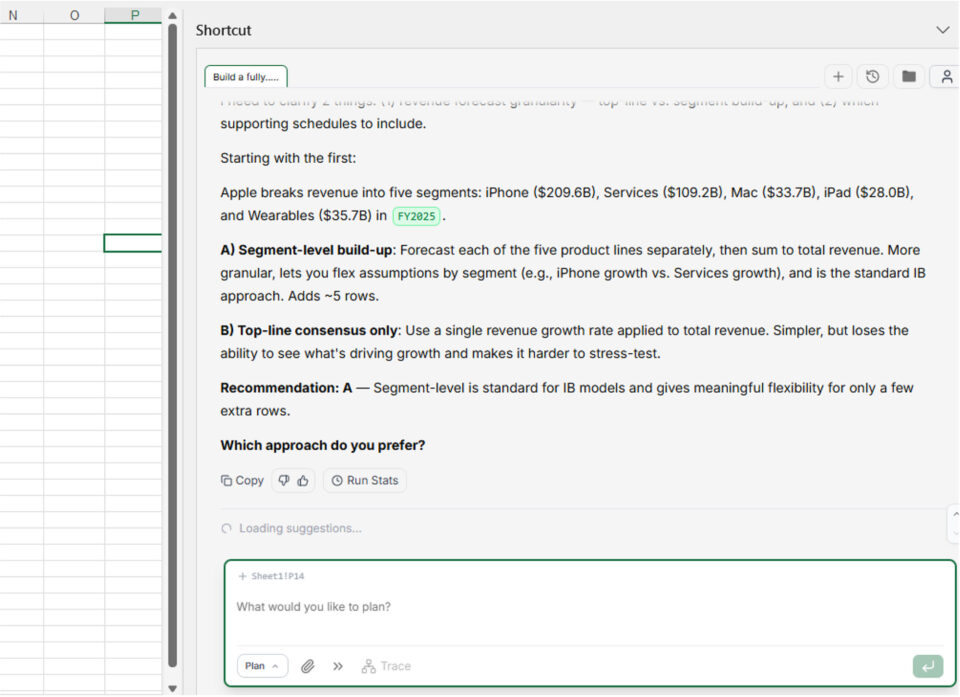
Claude and Shortcut asked the most thoughtful clarifying questions related to the prompt.
Speed: 🏆 Shortcut wins
Shortcut and Claude completed the setup in roughly 15 minutes, compared to ~25 minutes for Copilot. ChatGPT took close to an hour. A decent analyst would have taken 1-2 hours to complete the assignment. So all were faster than a human analyst at initial setup.
Criteria #2: Data Extraction, Formatting and Modeling Best Practices
This category evaluates whether the data is accurate, the model looks right and follows basic discipline.
Formatting: 🏆 Shortcut wins
Shortcut and Claude produced the most “investment-bank-like” outputs. Shortcut was more consistent with input coloring and structure. Claude missed several formatting conventions. Copilot ignored IB formatting entirely. ChatGPT was chaotic.
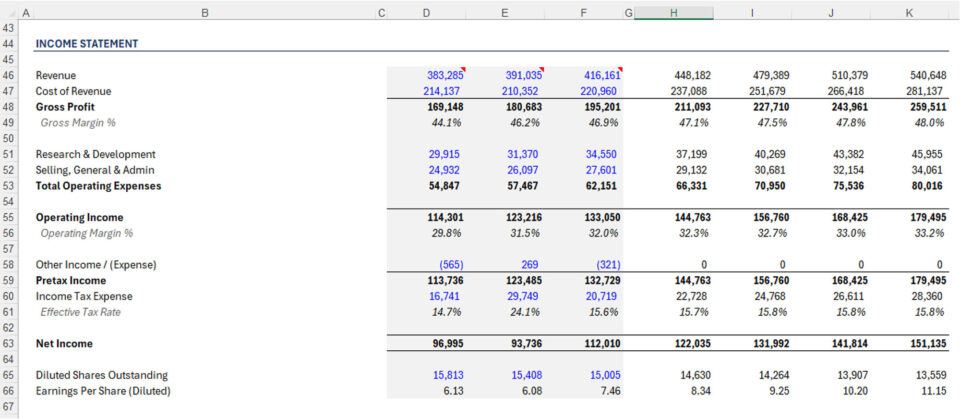
Shortcut’s 3 statement model formatting and layout – your MD would be proud.
Accuracy of historical data, assumptions, and sourcing: 🏆 Copilot wins
Copilot won, but this was disappointing across the board. Shortcut and Claude — the otherwise front runners — hallucinated significant portions of historical data. In both cases, the errors were subtle enough to be dangerous — slightly incorrect line items, all adding up to correct subtotals. (Shortcut’s second attempt returned almost no mistakes, Claude continued to generate bad data.)
Fixing this would require careful cell-by-cell auditing that takes longer than just inputting the numbers yourself. We were so surprised by the volume of mistakes that we reran the prompt a second time with both Shortcut and Claude to see if the result would be different. In fairness, they were better the second time – especially Shortcut – but in real life no Analyst will be rerunning the model multiple times in the hopes it gets better – so no extra points for that.
These results suggest that as a rule, analysts should not rely on these agents to find data and should instead upload PDFs and spreadsheets for the agents to work with.
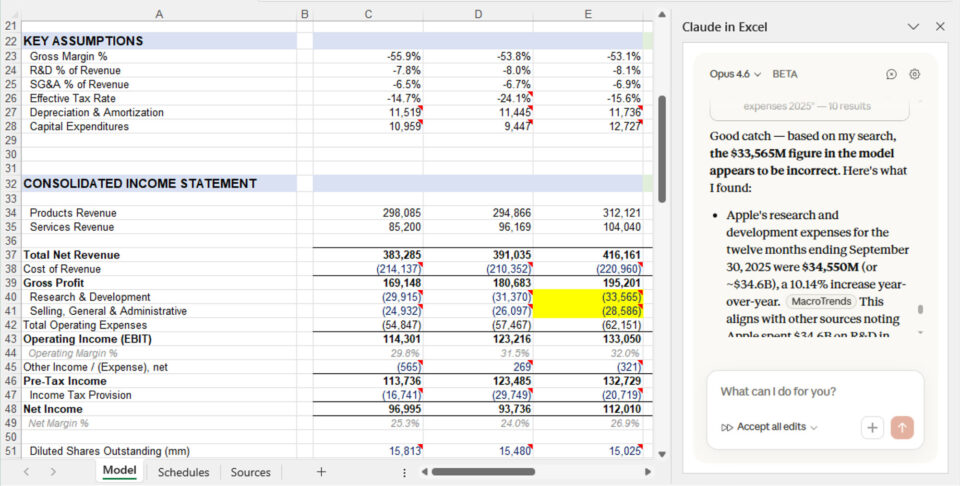
Claude and Shortcut both hallucinated significant amounts of historical data.
Copilot and ChatGPT were more accurate. ChatGPT’s presentation was the least polished, but its historical balance sheet was easiest to audit.
An important additional note — had Shortcut and Claude used correct data, they would have won because they were attempting a more analytically rigorous presentation of lumping certain line items together that logically make sense to be aggregated (current portion and non current portions of marketable securities, debt, etc). Shortcut was also going into the footnotes to break out certain items when appropriate. ChatGPT and Copilot felt much more like mindless order takers.
Sourcing and commenting: 🏆 Claude wins
Claude provided the best explanations of where data came from and why certain modeling decisions were made, though it sometimes over-commented. Copilot added no comments. ChatGPT added too many. Shortcut did some commenting, but less consistently.
Claude was also the only tool to backsolve EBITDA correctly.
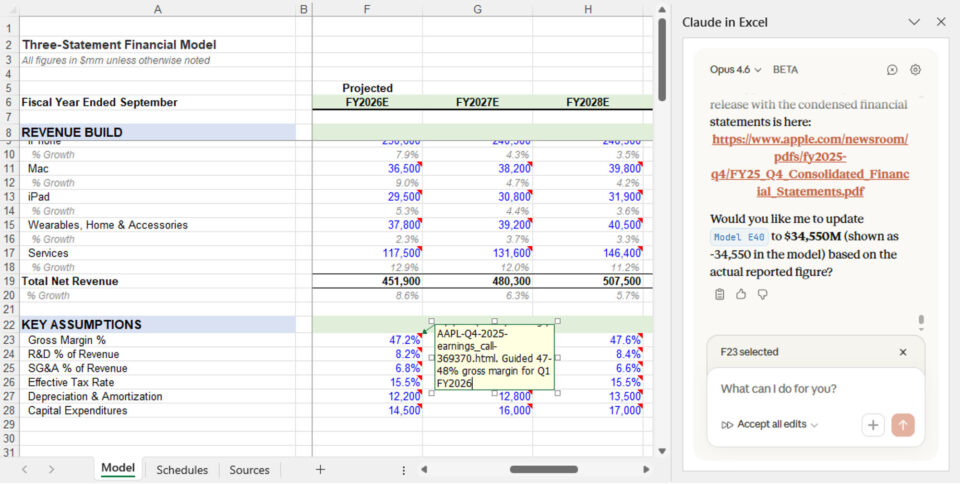
Claude provided the best explanations of where data came.

The AI in Business & Finance Certificate Program
Build a practical AI skillset and transform your career. No coding required! Enrollment is now open for upcoming cohort from Columbia Business School Executive Education and Wall Street Prep.
Enroll TodayCriteria #3: Forecasting, structure, and integration
This is an area where most agents fell short.
Flowthrough of assumptions: 🏆 Copilot wins
Copilot performed best largely because it built the simplest model. Shortcut came second. Claude and ChatGPT frequently hardcoded values that should have flowed through calculations.
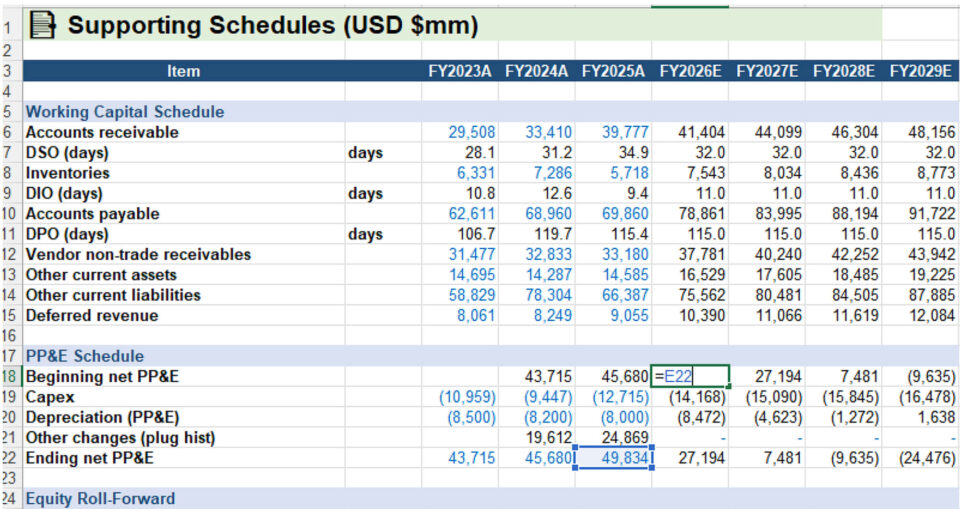
Copilot’s formulas had the fewest errors, but were also the most simplistic.
Income statement forecasting: 🏆 Claude and Shortcut tie
Shortcut’s revenue forecast benefited from product-level detail. Claude included EBITDA, which others missed. No agent modeled shares outstanding correctly.
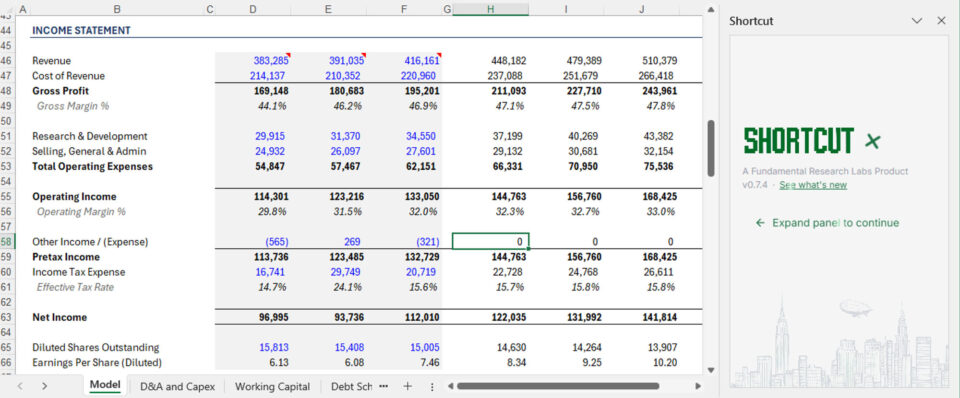
Shortcut forecasted revenue with product-level detail.
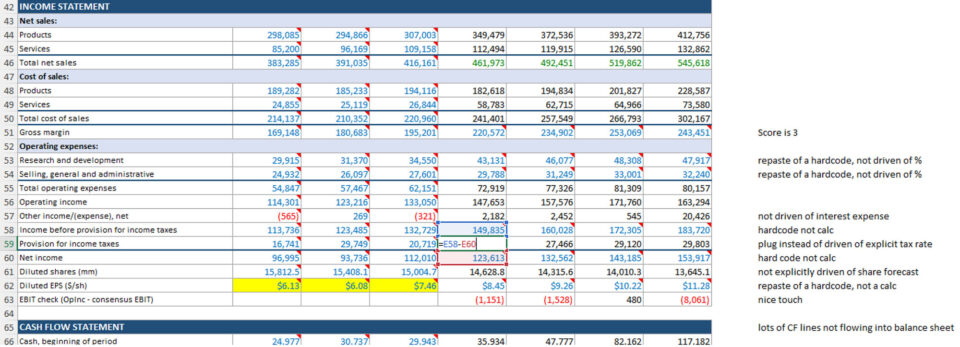
Lowest ranked ChatGPT was out of its depth forecasting the income statement.
Circularity: 👎 All failed
Since no tool forecasted interest income and expense from cash and debt balances, there was no circularity embedded in the model.
Balance sheet forecasting and integration: 🏆 Claude and Shortcut tie
While debates rage on the wisdom of adding a circularity, what is not debatable is that models must accurately capture changes in the balance sheet in the cash flow statement. Most agents handled working capital reasonably well. None handled debt correctly. Most relied on plugs rather than proper integration. Copilot’s simplicity made errors easier to spot. ChatGPT made the most mistakes.
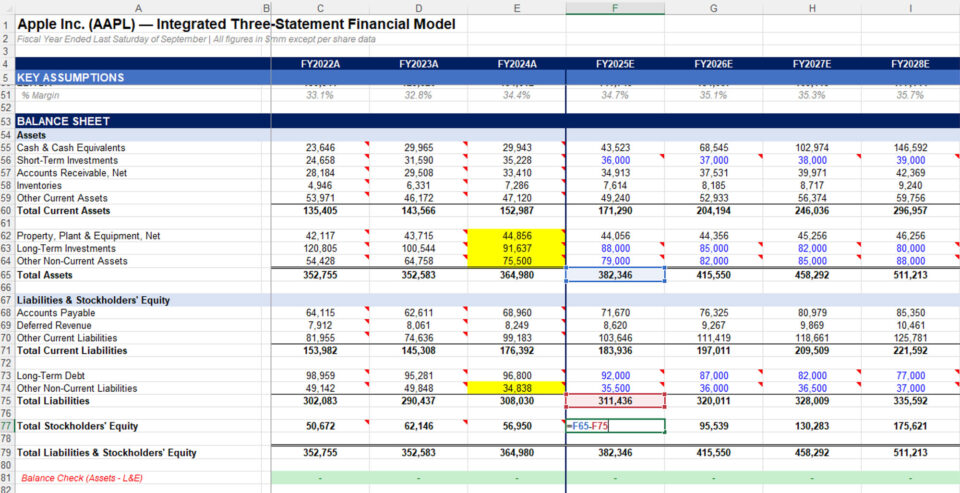
Claude, like all the agents, used plugs and ignored key connections between the financial statements rather than building a truly integrated model.
The best AI financial modeling tool is not as good as a bad analyst
It is important to note that we graded the tools on the same scale we grade our analysts.
On that scale, even the best tool we tested — Shortcut — underperformed compared to a lower bucket analyst.
Broadly, our tests showed that the volume of mistakes these tools produce is sizable, and this creates both risks and new opportunities for analysts who rely on them.
Specifically, risks emerge because the tools are very good at tempting you to give them more responsibility than they can handle.
That leads to the most crucial point here – used the right way, the tools we tested can be meaningful enhancers. Used the wrong way, these tools are productivity detractors.
The issues we encountered explain why adoption has been uneven. If you do not know where these tools tend to fail, you will ask too much, get burned, and give up — missing real productivity gains that come from using them correctly.
Final takeaway
Shortcut and Claude look, feel, and act the most like analysts. If forced to choose, it would be Shortcut, but Claude is a close second and has the advantage of being backed by bigger dollars than Shortcut.
ChatGPT and Copilot are not there (yet).
These tools for the moment are great at kickstarting a project, not true end to end companions (again…yet).
Used correctly, they save time. Trusted too much, they quietly create problems that take longer to fix than it takes to do the job without them.
That is the tradeoff, for now.
Methodology
This evaluation was conducted by Wall Street Prep’s research team using the model versions listed above. We tested each tool using an identical prompt and graded outputs against investment banking standards. Results may vary with different prompts, data sources, or model versions.
Below is the complete scorecard for each subtask we tested.
| Winner | Shortcut | Claude | Copilot | ChatGPT | |
| Category 1 – Speed and Understanding Intent | |||||
| Preparation & Speed | Shortcut | 10 | 10 | 7 | 0 |
| Category 2 – Data Importing, Formatting and Modeling Best Practices | |||||
| Formatting | Shortcut | 7 | 5 | 1 | 2 |
| Accuracy of Historical Data, Assumptions and Sourcing | Copilot | 5 | 3 | 8 | 7 |
| Sourcing and Commenting | Claude | 5 | 7 | 0 | 3 |
| Categroy 3 – Quality and Rigor of Forecasting and Model Structure | |||||
| Flowthrough of assumptions and hardcodes | Copilot | 7 | 6 | 8 | 3 |
| Income Statement Forecasting | Shortcut / Claude | 8 | 8 | 5 | 2 |
| Circularity | Tie | 0 | 0 | 0 | 0 |
| Balance Sheet Forecasting, Model balancing / integration | Copilot | 5 | 5 | 6 | 3 |
| Average Score | 5.9 | 5.5 | 4.4 | 2.5 |
Below are the typical top/mid/low analyst ranges.
| Top Analyst | Mid Analyst | Low Analyst | |
| Category 1 – Speed and Understanding Intent | |||
| Preparation & Speed | 5 | 3 | 1 |
| Category 2 – Data Importing, Formatting and Modeling Best Practices | |||
| Formatting | 10 | 8 | 6 |
| Accuracy of Historical Data, Assumptions and Sourcing | 10 | 8 | 6 |
| Sourcing and Commenting | 10 | 9 | 8 |
| Categroy 3 – Quality and Rigor of Forecasting and Model Structure | |||
| Flowthrough of assumptions and hardcodes | 10 | 9 | 8 |
| Income Statement Forecasting | 10 | 10 | 10 |
| Circularity | 10 | 8 | 6 |
| Balance Sheet Forecasting, Model balancing / integration | 10 | 8 | 6 |
| Average Score | 9.4 | 7.9 | 6.4 |
Below are the models each tool produced the first time.
Microsoft Copilot Agent Mode FSM
** As we noted earlier, we did give all the models a “second chance” where we pointed out certain areas where there were errors mostly to observe their ability to self correct. We only graded on the first attempt, but tt should be noted that Shortcut and Claude demonstrated significant improvement across two areas on the second try – data extraction – there were fewer errors, as well as model structure.
About Wall Street Prep: Wall Street Prep provides technical finance training to professionals at leading investment banks, private equity firms, and corporations.